
How to Ask About Your Answers
Ask a question about your form's answers and get a short reply with names and quotes. Free includes 3 questions a month, Pro 100.
Type a question about your form's answers and get a short reply drawn from what people said. Free includes 3 questions a month.
Ask a question
- Open Forms and click your form.
- Above the answers, type your question in Ask about these answers, for example "What did people like least?"
- Press Enter or click the arrow.

Before your first question on a form, you see suggestions under the box: What do people mention most?, Sum up the answers in 5 points and Who asked for something specific? Click one to ask it.
Questions can be up to 500 characters. The reply comes in the language you ask in.
Read the reply
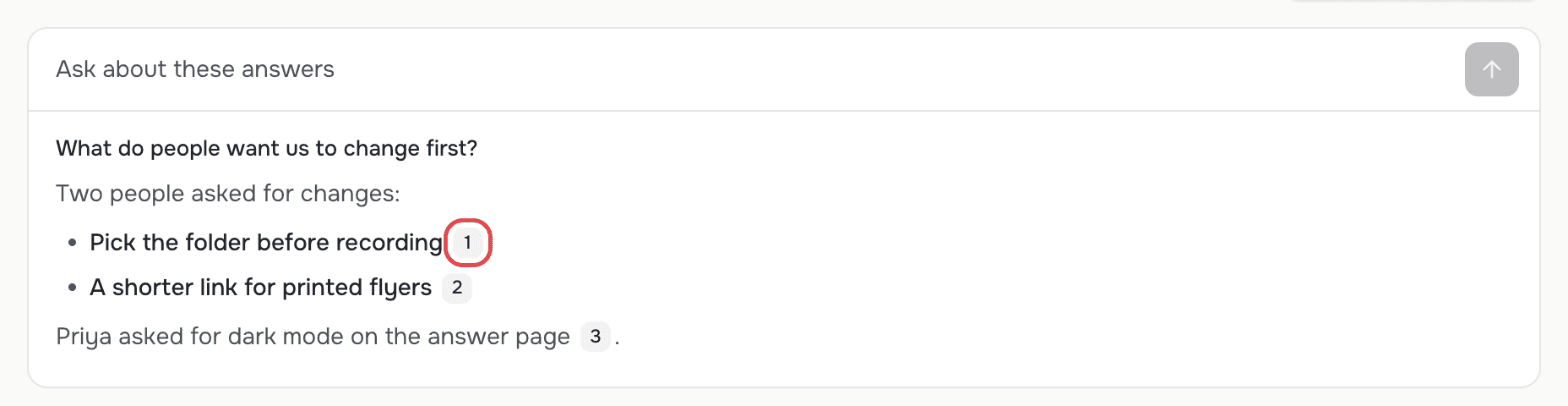
The reply names people and quotes short bits of their answers, like "Maria Lopez and Priya Nair asked for a mobile app." Each point ends with a number for the answer it comes from. Click the number to open that person's answers.
Answers waiting for your review are left out. On a form with a lot of answers, the reply may cover only the newest ones, and you see a line like Based on the newest 120 of 300 answers.
Find your earlier questions
Your questions and their replies stay on the form's page. The newest one shows under the box. Click Earlier questions to see the rest, and Show less to fold them away.
Monthly limits
| Plan | Questions a month |
|---|---|
| Free | 3 |
| Pro | 100 |
| Plus | 300 |
The count covers all your forms together and starts over on the 1st of each month. On Free, the box shows how many you have left, like 2 of 3 left this month.
Once you've used them all, you see You've used 3 of 3 questions this month. and the upgrade options. Your earlier replies stay on the page.
Next: Download your answers as a spreadsheet.