
What Question Types Can a Voice Form Have?
See every question type a voice form can have, which ones count toward your plan's limit, and how many fit on a step.
A voice form has 8 question types that take an answer, and 2 types of content without an answer. You add them in the builder: open Forms, click your form and click Edit, or click New voice form.
Pick a question type
In the outline, click Add question under a step. The picker groups the types under Answers, Choices, Details and Content. Pick a type and click its Add button, like Add text answer.
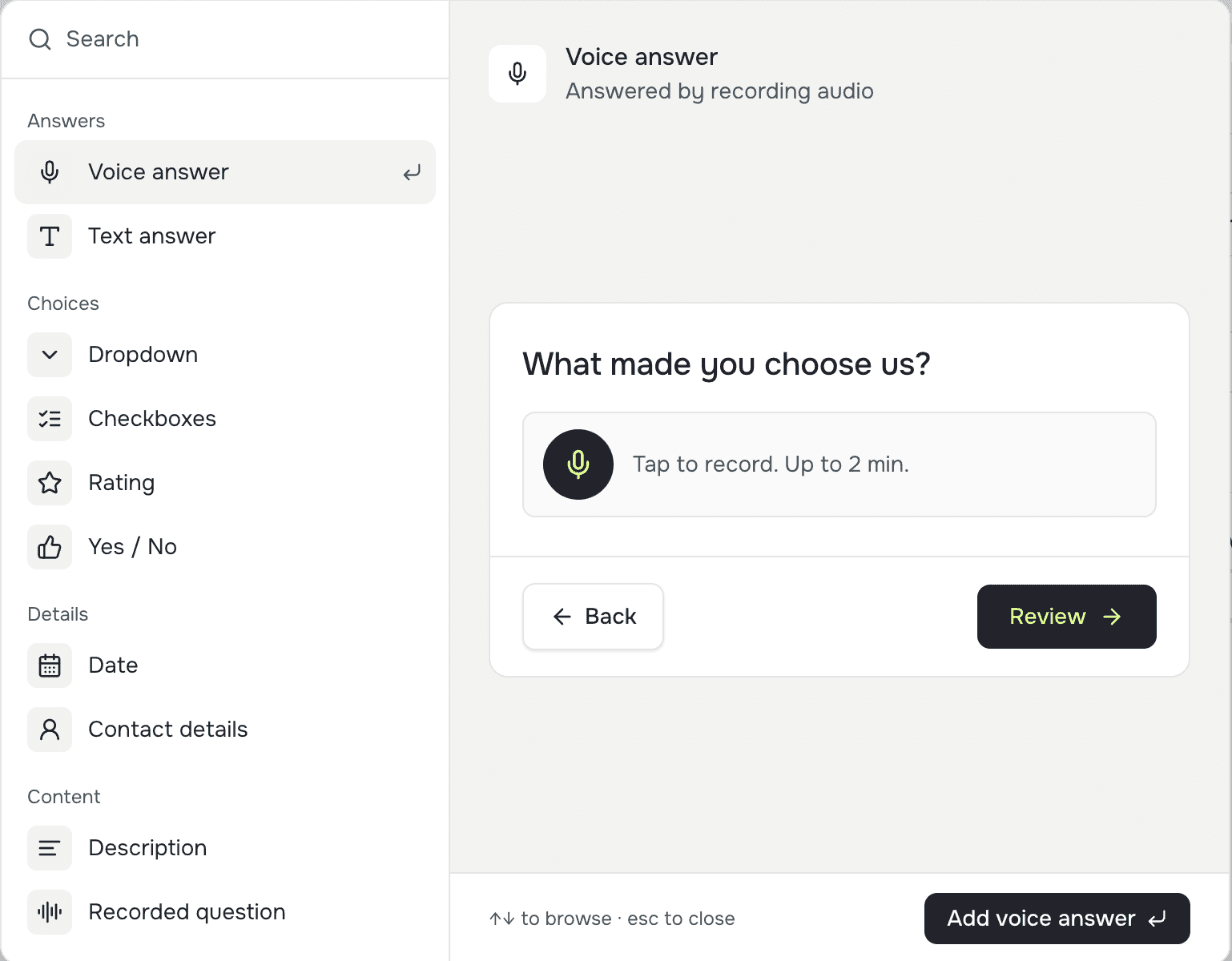
| Type | People answer by | More |
|---|---|---|
| Voice answer | Recording their voice | How to Create a Voice Form |
| Text answer | Typing, or dictating when you turn on Dictation | How to Let People Type or Dictate Their Answer |
| Dropdown | Picking one option from your list | How to Add a Multiple Choice Question |
| Checkboxes | Ticking any number of options | How to Add a Multiple Choice Question |
| Rating | Picking a number, 1 to 5 or 1 to 10 | How to Add a Multiple Choice Question |
| Yes / No | Picking Yes or No | How to Add a Multiple Choice Question |
| Date | Picking a date | |
| Contact details | Filling in their name, email, phone or company | How to Ask for Contact Details |
| Description | No answer. A paragraph of text | |
| Recorded question | No answer. Your question as a recording people play | How to Add a Recorded Question |
A form needs at least one Voice answer before you can save it.
Stay within your plan's question limit
Every type that takes an answer counts as one question. The Free plan allows 3 questions per form. Pro allows 20.
- Contact details counts as one question, however many details it asks for.
- Description and Recorded question don't count.
On the Free plan, once you reach 3 questions, the answer types in the picker show Pro. You can still add a Description or a Recorded question.
Fit questions on a step
Each step is one page of the form, with up to 6 questions, counting descriptions and recorded questions. A form has up to 30 steps.
A form has one Contact details question at most. Once you add it, the picker shows Added next to it.
Change a question's type
Select the question in the outline and pick another type at the top of the settings on the right. Voice answer, Text answer, Dropdown, Checkboxes, Rating, Yes / No and Date switch between each other and keep the question text. Contact details, Description and Recorded question keep their type.