
How to Duplicate or Delete a Voice Form
Copy a voice form with its questions and settings, or delete a form and stop its links. Download the answers first to keep them.
You'll find both in the ⋯ menu at the top of your form's page.
Duplicate a form
- Open your form under Forms.
- Click ⋯ next to Edit at the top.
- Click Duplicate.
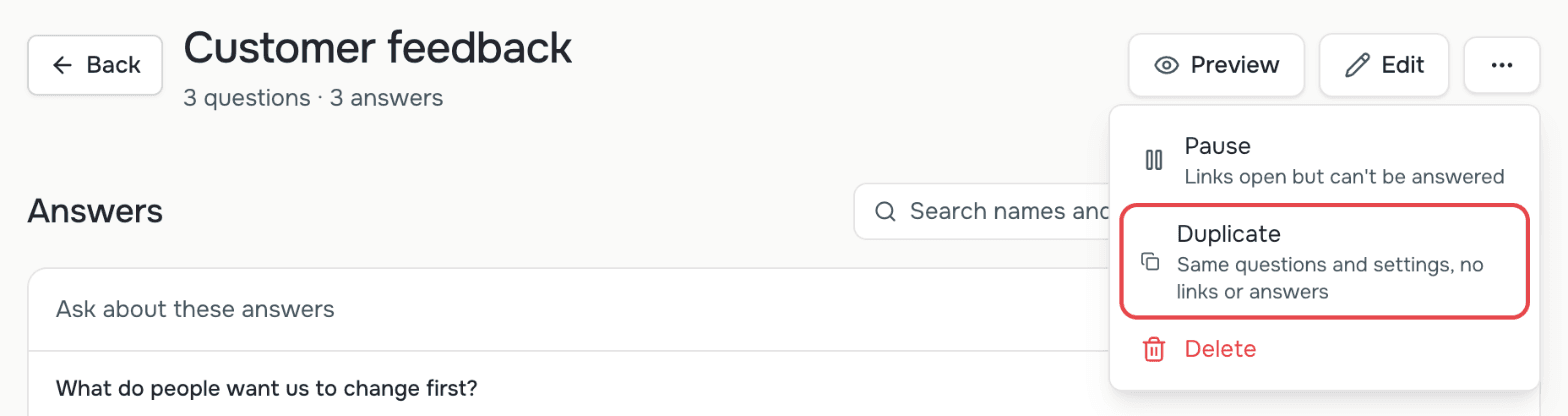
The copy opens in the builder, named like Customer feedback (copy). It has the same questions and settings, with no links or answers. Turn on its public link or create private links as for a new form. See How to Share a Voice Form. A closing date isn't copied.
The copy is live, so it counts toward your live forms. If you already have as many live forms as your plan allows, or the form has more questions than your plan allows, you see the upgrade options instead.
Delete a form
- Click ⋯ next to Edit, then click Delete.
- Under Delete this voice form?, click Delete to confirm.
Every link of the form stops working, public and private. People who open one see This link doesn't work. Ask the person who sent it for a new one. The form and its answers no longer show under Forms, and you can't bring the form back.
To keep the answers, download them before you delete the form. To stop taking answers and keep the form, pause it instead. See How to Close a Voice Form.
A deleted form no longer counts toward your live forms.